NO.56 Which three components are part of Oracle Cloud Infrastructure (OCI) identity and access management service?
Components of IAM
IAM uses the components described in this section. To better understand how the components fit together, see Example Scenario.
RESOURCE
The cloud objects that your company’s employees create and use when interacting with Oracle Cloud Infrastructure. For example: compute instances, block storage volumes, virtual cloud networks (VCNs), subnets, route tables, etc.
USER
An individual employee or system that needs to manage or use your company’s Oracle Cloud Infrastructure resources. Users might need to launch instances, manage remote disks, work with your virtual cloud network, etc. End users of your application are not typically IAM users. Users have one or more IAM credentials (see User Credentials).
GROUP
A collection of users who all need the same type of access to a particular set of resources or compartment.
DYNAMIC GROUP
A special type of group that contains resources (such as compute instances) that match rules that you define (thus the membership can change dynamically as matching resources are created or deleted). These instances act as “principal” actors and can make API calls to services according to policies that you write for the dynamic group.
NETWORK SOURCE
A group of IP addresses that are allowed to access resources in your tenancy. The IP addresses can be public IP addresses or IP addresses from a VCN within your tenancy. After you create the network source, you use policy to restrict access to only requests that originate from the IPs in the network source.
COMPARTMENT
A collection of related resources. Compartments are a fundamental component of Oracle Cloud Infrastructure for organizing and isolating your cloud resources. You use them to clearly separate resources for the purposes of measuring usage and billing, access (through the use of policies), and isolation (separating the resources for one project or business unit from another). A common approach is to create a compartment for each major part of your organization. For more information, see Setting Up Your Tenancy.
TENANCY
The root compartment that contains all of your organization’s Oracle Cloud Infrastructure resources. Oracle automatically creates your company’s tenancy for you. Directly within the tenancy are your IAM entities (users, groups, compartments, and some policies; you can also put policies into compartments inside the tenancy). You place the other types of cloud resources (e.g., instances, virtual networks, block storage volumes, etc.) inside the compartments that you create.
POLICY
A document that specifies who can access which resources, and how. Access is granted at the group and compartment level, which means you can write a policy that gives a group a specific type of access within a specific compartment, or to the tenancy itself. If you give a group access to the tenancy, the group automatically gets the same type of access to all the compartments inside the tenancy. For more information, see Example Scenario and How Policies Work. The word “policy” is used by people in different ways: to mean an individual statement written in the policy language; to mean a collection of statements in a single, named “policy” document (which has an Oracle Cloud ID (OCID) assigned to it); and to mean the overall body of policies your organization uses to control access to resources.
HOME REGION
The region where your IAM resources reside. All IAM resources are global and available across all regions, but the master set of definitions reside in a single region, the home region. You must make changes to your IAM resources in your home region. The changes will be automatically propagated to all regions. For more information, see Managing Regions.
FEDERATION
A relationship that an administrator configures between an identity provider and a service provider. When you federate Oracle Cloud Infrastructure with an identity provider, you manage users and groups in the identity provider. You manage authorization in Oracle Cloud Infrastructure’s IAM service. Oracle Cloud Infrastructure tenancies are federated with Oracle Identity Cloud Service by default.
https://docs.cloud.oracle.com/en-us/iaas/Content/Identity/Concepts/overview.htm
NO.61 Which Oracle Cloud Infrastructure (OCI) service can be used to protect sensitive and regulated data in OCI database services?
Oracle Data Safe is a unified control center for your Oracle databases which helps you understand the sensitivity of your data, evaluate risks to data, mask sensitive data, implement and monitor security controls, assess user security, monitor user activity, and address data security compliance requirements.
Whether you’re using an Autonomous Database or an Oracle DB system, Oracle Data Safe delivers essential data security capabilities as a service on Oracle Cloud Infrastructure.
Features of Oracle Data Safe:
Oracle Data Safe provides the following set of features for protecting sensitive and regulated data in Oracle Cloud databases, all in a single, easy-to-use management console:
1) Security Assessment helps you assess the security of your cloud database configurations. It analyzes database configurations, user accounts, and security controls, and then reports the findings with recommendations for remediation activities that follow best practices to reduce or mitigate risk.
2) User Assessment helps you assess the security of your database users and identify high risk users. It reviews information about your users in the data dictionary on your target databases, and calculates a risk score for each user. For example, it evaluates the user types, how users are authenticated, the password policies assigned to each user, and how long it has been since each user has changed their password. It also provides a direct link to audit records related to each user. With this information, you can then deploy appropriate security controls and policies.
3) Data Discovery helps you find sensitive data in your cloud databases. You tell Data Discovery what kind of sensitive data to search for, and it inspects the actual data in your database and its data dictionary, and then returns to you a list of sensitive columns. By default, Data Discovery can search for a wide variety of sensitive data pertaining to identification, biographic, IT, financial, healthcare, employment, and academic information.
4) Data Masking provides a way for you to mask sensitive data so that the data is safe for non-production purposes. For example, organizations often need to create copies of their production data to support development and test activities. Simply copying the production data exposes sensitive data to new users. To avoid a security risk, you can use Data Masking to replace the sensitive data with realistic, but fictitious data.
5) Activity Auditing lets you audit user activity on your databases so you can monitor database usage and be alerted of unusual database activities.
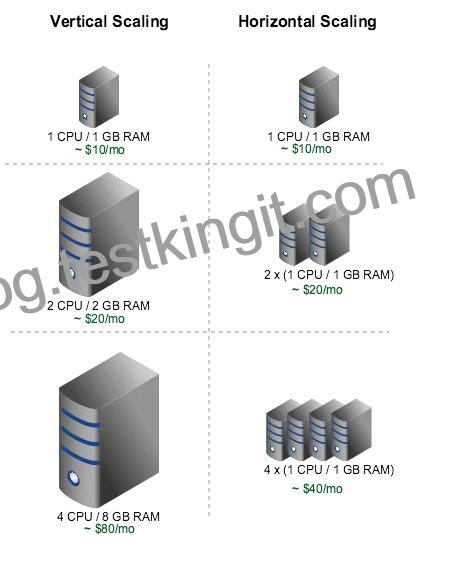
NO.63 What does compute instance vertical scaling mean?
Changing the Shape of an Instance (Horizontal Scaling)
You can change the shape of a virtual machine (VM) instance without having to rebuild your instances or redeploy your applications. This lets you scale up your Compute resources for increased performance, or scale down to reduce cost.
Autoscaling (vertical scaling)
Autoscaling lets you automatically adjust the number of Compute instances in an instance pool based on performance metrics such as CPU utilization. This helps you provide consistent performance for your end users during periods of high demand, and helps you reduce your costs during periods of low demand.
As load increases, instances are automatically provisioned: the instance pool scales out. As load decreases, instances are automatically removed: the instance pool scales in.
https://docs.cloud.oracle.com/en-us/iaas/Content/Compute/Tasks/resizinginstances.htm
NO.64 Which statement about Oracle Cloud Infrastructure (OCI) shared security model is true?
Oracle Cloud Infrastructure offers best-in-class security technology and operational processes to secure its enterprise cloud services. However, for you to securely run your workloads in Oracle Cloud Infrastructure, you must be aware of your security and compliance responsibilities. By design, Oracle provides security of cloud infrastructure and operations (cloud operator access controls, infrastructure security patching, and so on), and you are responsible for securely configuring your cloud resources. Security in the cloud is a shared responsibility between you and Oracle.
In a shared, multi-tenant compute environment, Oracle is responsible for the security of the underlying cloud infrastructure (such as data-center facilities, and hardware and software systems) and you are responsible for securing your workloads and configuring your services (such as compute, network, storage, and database) securely.
In a fully isolated, single-tenant, bare metal server with no Oracle software on it, your responsibility increases as you bring the entire software stack (operating systems and above) on which you deploy your applications. In this environment, you are responsible for securing your workloads, and configuring your services (compute, network, storage, database) securely, and ensuring that the software components that you run on the bare metal servers are configured, deployed, and managed securely.
More specifically, your and Oracle’s responsibilities can be divided into the following areas:
Identity and Access Management (IAM): As with all Oracle cloud services, you should protect your cloud access credentials and set up individual user accounts. You are responsible for managing and reviewing access for your own employee accounts and for all activities that occur under your tenancy. Oracle is responsible for providing effective IAM services such as identity management, authentication, authorization, and auditing.
Workload Security: You are responsible for protecting and securing the operating system and application layers of your compute instances from attacks and compromises. This protection includes patching applications and operating systems, operating system configuration, and protection against malware and network attacks. Oracle is responsible for providing secure images that are hardened and have the latest patches. Also, Oracle makes it simple for you to bring the same third-party security solutions that you use today.
Data Classification and Compliance: You are responsible for correctly classifying and labeling your data and meeting any compliance obligations. Also, you are responsible for auditing your solutions to ensure that they meet your compliance obligations.
Host Infrastructure Security: You are responsible for securely configuring and managing your compute (virtual hosts, containers), storage (object, local storage, block volumes), and platform (database configuration) services. Oracle has a shared responsibility with you to ensure that the service is optimally configured and secured. This responsibility includes hypervisor security and the configuration of the permissions and network access controls required to ensure that hosts can communicate correctly and that devices are able to attach or mount the correct storage devices.
Network Security: You are responsible for securely configuring network elements such as virtual networking, load balancing, DNS, and gateways. Oracle is responsible for providing a secure network infrastructure.
Client and Endpoint Protection: Your enterprise uses various hardware and software systems, such as mobile devices and browsers, to access your cloud resources. You are responsible for securing all clients and endpoints that you allow to access Oracle Cloud Infrastructure services.
Physical Security: Oracle is responsible for protecting the global infrastructure that runs all of the services offered in Oracle Cloud Infrastructure. This infrastructure consists of the hardware, software, networking, and facilities that run Oracle Cloud Infrastructure services.
Reference:
https://www.oracle.com/a/ocom/docs/oracle-cloud-infrastructure-security-architecture.pdf
NO.67 A customer is looking to migrate their old database backups from their on-premises data center to Oracle Cloud Infrastructure (OCI). Which OCI service is the most cost-effective?
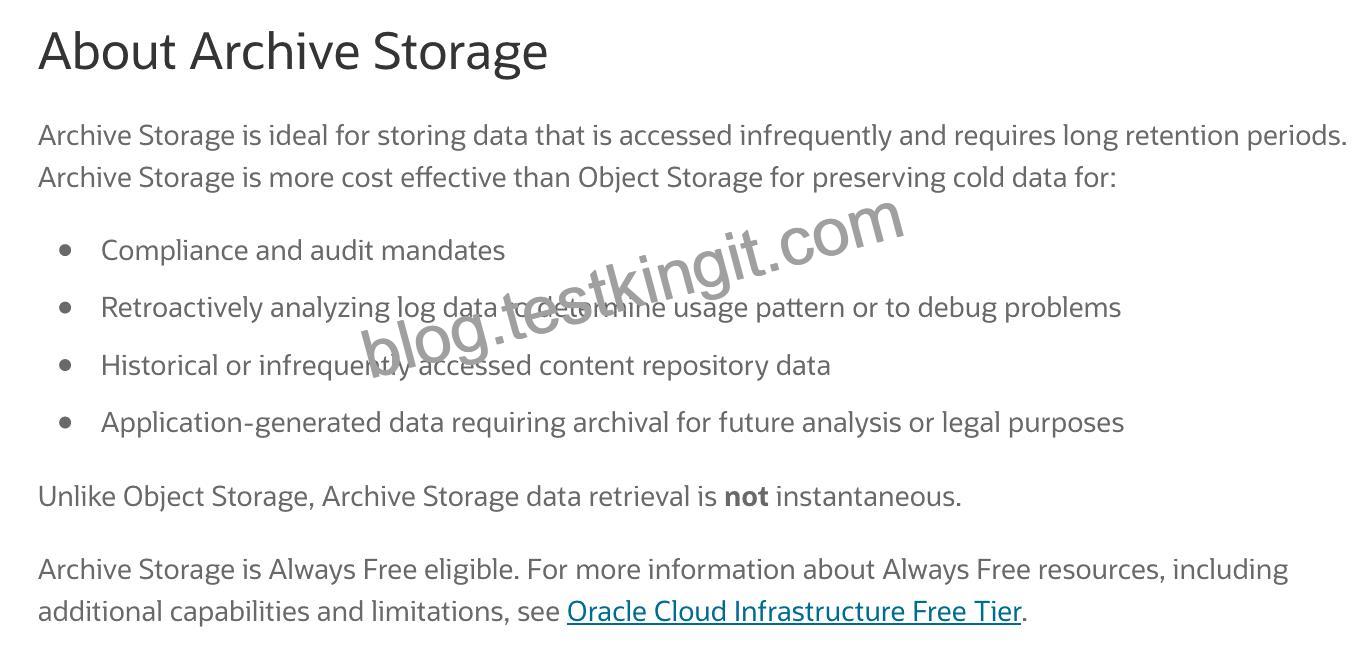
Archive storage is the most cost effective for archive data
Reference:
https://www.oracle.com/cloud/storage/archive-storage.html
Oracle Cloud Infrastructure offers two distinct storage class tiers to address the need for both performant, frequently accessed “hot” storage, and less frequently accessed “cold” storage. Storage tiers help you maximize performance where appropriate and minimize costs where possible.
1) Use Archive Storage for data to which you seldom or rarely access, but that must be retained and preserved for long periods of time. The cost efficiency of the Archive Storage offsets the long lead time required to access the data.
2) Use Object Storage for data to which you need fast, immediate, and frequent access. Data accessibility and performance justifies a higher price to store data in the Object Storage. For more information, see Overview of Object Storage.
NO.75 Which three methods can you use to create or modify Oracle Cloud Infrastructure (OCI) resources?
You can create and manage resources in the following ways:
Oracle Cloud Infrastructure Console The Console is an intuitive, graphical interface that lets you create and manage your instances, cloud networks, and storage volumes, as well as your users and permissions. See Using the Console.
Oracle Cloud Infrastructure APIs The Oracle Cloud Infrastructure APIs are typical REST APIs that use HTTPS requests and responses. See API Requests.
SDKs Several Software Development Kits are available for easy integration with the Oracle Cloud Infrastructure APIs, including SDKs for Java, Ruby, and Python. For more information, see Developer Resources.
Command Line Interface (CLI) You can use a command line interface with some services. For more information, see Developer Resources.
Terraform Oracle supports Terraform. Terraform is “infrastructure-as-code” software that allows you to define your infrastructure resources in files that you can persist, version, and share. For more information, see Getting Started with the Terraform Provider.
Ansible Oracle supports the use of Ansible for cloud infrastructure provisioning, orchestration, and configuration management. Ansible allows you to automate configuring and provisioning your cloud infrastructure, deploying and updating software assets, and orchestrating your complex operational processes. For more information, see Getting Started with Ansible for Oracle Cloud Infrastructure.
Resource Manager Resource Manager is an Oracle Cloud Infrastructure service that allows you to automate the process of provisioning your Oracle Cloud Infrastructure resources. It helps you install, configure, and manage resources using the “infrastructure-as-code” model. For more information, see Overview of Resource Manager.
Reference:
https://docs.cloud.oracle.com/en-us/iaas/pdf/gsg/OCI_Getting_Started.pdf
