4/5 - (1 vote)

2023 TestKingIT Linux Foundation CKS Dumps and Exam Test Engine

Linux Foundation CKS DUMPS WITH REAL EXAM QUESTIONS

NEW QUESTION 26
You can switch the cluster/configuration context using the following command:
[desk@cli] $ kubectl config use-context stage
Context:
A PodSecurityPolicy shall prevent the creation of privileged Pods in a specific namespace.
Task:
1. Create a new PodSecurityPolcy named deny-policy, which prevents the creation of privileged Pods.
2. Create a new ClusterRole name deny-access-role, which uses the newly created PodSecurityPolicy deny-policy.
3. Create a new ServiceAccount named psd-denial-sa in the existing namespace development.
Finally, create a new ClusterRoleBindind named restrict-access-bind, which binds the newly created ClusterRole deny-access-role to the newly created ServiceAccount psp-denial-sa

NEW QUESTION 27
You must complete this task on the following cluster/nodes:
Cluster: apparmor
Master node: master
Worker node: worker1
You can switch the cluster/configuration context using the following command:
[desk@cli] $ kubectl config use-context apparmor
Given: AppArmor is enabled on the worker1 node.
Task:
On the worker1 node,
1. Enforce the prepared AppArmor profile located at: /etc/apparmor.d/nginx
2. Edit the prepared manifest file located at /home/cert_masters/nginx.yaml to apply the apparmor profile
3. Create the Pod using this manifest

NEW QUESTION 28
You must complete this task on the following cluster/nodes:
Cluster: trace
Master node: master
Worker node: worker1
You can switch the cluster/configuration context using the following command:
[desk@cli] $ kubectl config use-context trace
Given: You may use Sysdig or Falco documentation.
Task:
Use detection tools to detect anomalies like processes spawning and executing something weird frequently in the single container belonging to Pod tomcat.
Two tools are available to use:
1. falco
2. sysdig
Tools are pre-installed on the worker1 node only.
Analyse the container’s behaviour for at least 40 seconds, using filters that detect newly spawning and executing processes.
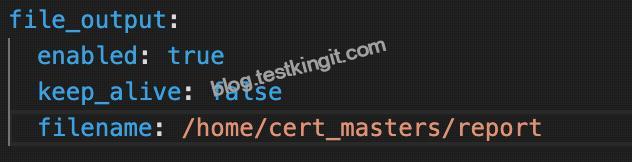
Store an incident file at /home/cert_masters/report, in the following format:
[timestamp],[uid],[processName]
Note: Make sure to store incident file on the cluster’s worker node, don’t move it to master node.

NEW QUESTION 29
You can switch the cluster/configuration context using the following command:
[desk@cli] $ kubectl config use-context test-account
Task: Enable audit logs in the cluster.
To do so, enable the log backend, and ensure that:
1. logs are stored at /var/log/Kubernetes/logs.txt
2. log files are retained for 5 days
3. at maximum, a number of 10 old audit log files are retained
A basic policy is provided at /etc/Kubernetes/logpolicy/audit-policy.yaml. It only specifies what not to log.
Note: The base policy is located on the cluster’s master node.
Edit and extend the basic policy to log:
1. Nodes changes at RequestResponse level
2. The request body of persistentvolumes changes in the namespace frontend
3. ConfigMap and Secret changes in all namespaces at the Metadata level Also, add a catch-all rule to log all other requests at the Metadata level Note: Don’t forget to apply the modified policy.

NEW QUESTION 30
Context
AppArmor is enabled on the cluster’s worker node. An AppArmor profile is prepared, but not enforced yet.

Task
On the cluster’s worker node, enforce the prepared AppArmor profile located at /etc/apparmor.d/nginx_apparmor.
Edit the prepared manifest file located at /home/candidate/KSSH00401/nginx-pod.yaml to apply the AppArmor profile.
Finally, apply the manifest file and create the Pod specified in it.

NEW QUESTION 31
SIMULATION
use the Trivy to scan the following images,
1. amazonlinux:1
2. k8s.gcr.io/kube-controller-manager:v1.18.6
Look for images with HIGH or CRITICAL severity vulnerabilities and store the output of the same in /opt/trivy-vulnerable.txt


NEW QUESTION 32
Create a Pod name Nginx-pod inside the namespace testing, Create a service for the Nginx-pod named nginx-svc, using the ingress of your choice, run the ingress on tls, secure port.

NEW QUESTION 33
You can switch the cluster/configuration context using the following command: [desk@cli] $ kubectl config use-context test-account Task: Enable audit logs in the cluster.
To do so, enable the log backend, and ensure that:
1. logs are stored at /var/log/Kubernetes/logs.txt
2. log files are retained for 5 days
3. at maximum, a number of 10 old audit log files are retained
A basic policy is provided at /etc/Kubernetes/logpolicy/audit-policy.yaml. It only specifies what not to log. Note: The base policy is located on the cluster’s master node.
Edit and extend the basic policy to log: 1. Nodes changes at RequestResponse level 2. The request body of persistentvolumes changes in the namespace frontend 3. ConfigMap and Secret changes in all namespaces at the Metadata level Also, add a catch-all rule to log all other requests at the Metadata level Note: Don’t forget to apply the modified policy.

NEW QUESTION 34
Create a network policy named restrict-np to restrict to pod nginx-test running in namespace testing.
Only allow the following Pods to connect to Pod nginx-test:-
1. pods in the namespace default
2. pods with label version:v1 in any namespace.
Make sure to apply the network policy.


NEW QUESTION 35
On the Cluster worker node, enforce the prepared AppArmor profile
#include <tunables/global>
profile nginx-deny flags=(attach_disconnected) {
#include <abstractions/base>
file,
# Deny all file writes.
deny /** w,
}
EOF’


NEW QUESTION 36
SIMULATION
Service is running on port 389 inside the system, find the process-id of the process, and stores the names of all the open-files inside the /candidate/KH77539/files.txt, and also delete the binary.


NEW QUESTION 37
Create a User named john, create the CSR Request, fetch the certificate of the user after approving it.
Create a Role name john-role to list secrets, pods in namespace john
Finally, Create a RoleBinding named john-role-binding to attach the newly created role john-role to the user john in the namespace john.
To Verify: Use the kubectl auth CLI command to verify the permissions.

NEW QUESTION 38
Cluster: qa-cluster
Master node: master Worker node: worker1
You can switch the cluster/configuration context using the following command:
[desk@cli] $ kubectl config use-context qa-cluster
Task:
Create a NetworkPolicy named restricted-policy to restrict access to Pod product running in namespace dev.
Only allow the following Pods to connect to Pod products-service:
1. Pods in the namespace qa
2. Pods with label environment: stage, in any namespace

NEW QUESTION 39
Service is running on port 389 inside the system, find the process-id of the process, and stores the names of all the open-files inside the /candidate/KH77539/files.txt, and also delete the binary.

NEW QUESTION 40
SIMULATION
Enable audit logs in the cluster, To Do so, enable the log backend, and ensure that
1. logs are stored at /var/log/kubernetes-logs.txt.
2. Log files are retained for 12 days.
3. at maximum, a number of 8 old audit logs files are retained.
4. set the maximum size before getting rotated to 200MB
Edit and extend the basic policy to log:
1. namespaces changes at RequestResponse
2. Log the request body of secrets changes in the namespace kube-system.
3. Log all other resources in core and extensions at the Request level.
4. Log “pods/portforward”, “services/proxy” at Metadata level.
5. Omit the Stage RequestReceived
All other requests at the Metadata level

NEW QUESTION 41
SIMULATION
Create a RuntimeClass named gvisor-rc using the prepared runtime handler named runsc.
Create a Pods of image Nginx in the Namespace server to run on the gVisor runtime class

NEW QUESTION 42
Using the runtime detection tool Falco, Analyse the container behavior for at least 20 seconds, using filters that detect newly spawning and executing processes in a single container of Nginx.


NEW QUESTION 43
use the Trivy to scan the following images,


NEW QUESTION 44
SIMULATION
On the Cluster worker node, enforce the prepared AppArmor profile
#include <tunables/global>
profile nginx-deny flags=(attach_disconnected) {
#include <abstractions/base>
file,
# Deny all file writes.
deny /** w,
}
EOF’
Edit the prepared manifest file to include the AppArmor profile.
apiVersion: v1
kind: Pod
metadata:
name: apparmor-pod
spec:
containers:
– name: apparmor-pod
image: nginx
Finally, apply the manifests files and create the Pod specified on it.
Verify: Try to make a file inside the directory which is restricted.


Linux Foundation CKS (Certified Kubernetes Security Specialist) Certification Exam is a highly sought-after certification for professionals who want to demonstrate their mastery of Kubernetes security concepts and best practices. The CKS exam is designed to test the candidate’s ability to secure containerized applications running on Kubernetes clusters. It is an advanced-level certification exam that requires a deep understanding of Kubernetes architecture, security principles, and best practices.


2023 New TestKingIT CKS PDF Recently Updated Questions: https://www.testkingit.com/Linux-Foundation/latest-CKS-exam-dumps.html

Related Links: www.stes.tyc.edu.tw www.stes.tyc.edu.tw www.stes.tyc.edu.tw www.stes.tyc.edu.tw www.stes.tyc.edu.tw www.stes.tyc.edu.tw